AntennaPod APK for Android: Official Download & Offline Podcasts
Description
AntennaPod APK for Android is worth considering if you want to subscribe to podcasts, download episodes before travelling and keep control of your listening queue. The app is free and open source. Its official download page identifies Google Play and F-Droid as its supported distribution channels.
This guide uses project documentation checked on 15 October 2026. It offers a practical listening and storage workflow; APKNIKO has not measured battery use or compared audio quality across devices.
What is AntennaPod?
AntennaPod is a podcast manager and player for Android. You can follow feeds, stream or download episodes, change playback speed and use a sleep timer. The Google Play listing identifies the AntennaPod Open Source Team and the package de.danoeh.antennapod.
The app itself does not insert its own advertising. However, an episode can still contain advertising placed there by its creator or hosting service. An ad-free player does not remove spoken sponsorships from an audio recording.
It is also a player, not a subscription that unlocks every paid podcast. A private feed may require a separate subscription or credentials from its publisher. Keep that distinction in mind when comparing a podcast app with a service that also sells exclusive programmes.
AntennaPod APK download: use a supported channel
The button opens the official Google Play listing. APKNIKO does not host a repacked installer or charge a separate activation fee.
The official download page also links to F-Droid. The project explains that F-Droid updates can arrive later than its Google Play releases. A small difference in release timing does not automatically mean your installed app is broken.
Choose one trusted channel and use it consistently. If Android refuses an update after you switch sources, do not uninstall immediately. First protect your subscriptions and settings. Our APK update guide covers the basic precautions, while the APK download guide explains source checks.
Build a small podcast library first
Start by adding two or three shows you already know. Search within the app or add a publisher’s RSS address when it provides one. Check the programme name, publisher and episode descriptions before subscribing. Similar names can lead to different feeds.
Play one recent episode as a short test. Confirm that its language, format and audio match what you expected. Then download one episode and try it without a connection. This helps you understand the difference between following a show and keeping its audio on the phone.
A useful beginner arrangement is one daily show, one longer learning series and one programme you listen to for enjoyment. You can expand later. Following dozens of feeds immediately creates a large unread list and makes download settings harder to judge.
The project’s documentation hub covers subscriptions, playback, downloads and syncing. Use the relevant section when a menu label differs from the instructions you find in an older tutorial.
Prepare a dependable offline listening queue
For a journey, build the queue while you still have a reliable connection. Pick specific episodes instead of downloading an entire back catalogue. Compare their combined duration with the time you expect to spend listening, and leave a little extra room for a delayed trip.
Check that each chosen episode has actually completed downloading. A title visible in the library may describe a streamable episode that is not stored locally. Before leaving, briefly test one downloaded item with mobile data and Wi-Fi unavailable.
Keep a little free storage beyond the audio itself. Android needs working space for updates and temporary files. If the phone is nearly full, downloading several long episodes may fail even though individual files seem small enough.
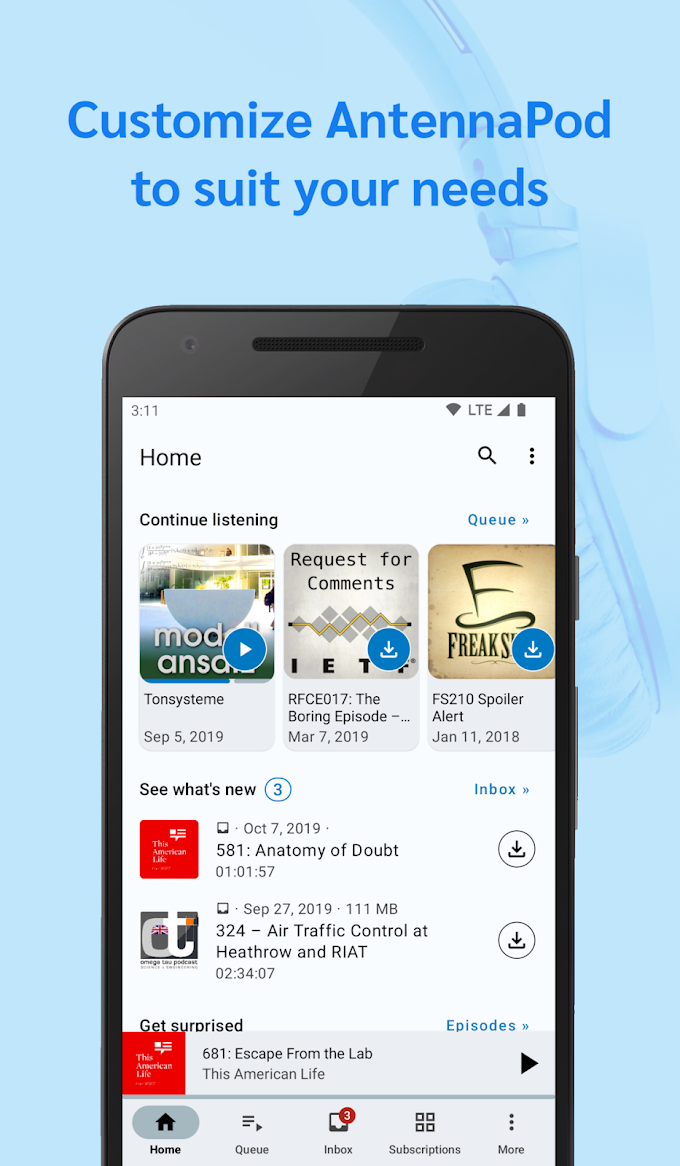
When you finish a downloaded episode, decide whether to keep or remove its local audio. Deleting a download is a different action from unfollowing a programme. Read the confirmation carefully so a storage clean-up does not accidentally remove a subscription you wanted to keep.
Set automatic downloads to match your connection
Automatic downloads are convenient for a daily show, but they can also consume data and space without much visible activity. Review the app’s download preferences before enabling broad automation. Use Wi-Fi-only downloading if that fits your mobile-data plan.
For a show with frequent episodes, begin with a modest rule and check the results after a few days. A rarely updated interview programme may need a different arrangement. One setting for every subscription is easy to create but may not fit how you actually listen.
If downloads stop only when the screen is off, investigate Android’s battery or background-data restrictions. Change the relevant setting for AntennaPod and test again. Do not disable phone-wide power management just because one task failed once.
For example, a student with limited mobile data can download selected lessons each evening and keep automatic downloading off for casual shows. Someone with unlimited home Wi-Fi may prefer a more automated queue. Both approaches can work without filling the device with episodes they will never hear.
Use speed controls and a sleep timer deliberately
Playback speed can make a familiar programme easier to fit into a short break. Start with a small change and check whether you still understand names and technical details. Faster playback is not useful if you repeatedly rewind the same section.
A sleep timer is helpful when listening at night. Set it for a manageable period rather than leaving a long queue running. That makes it easier to find your place the following morning and avoids marking hours of unheard material as played.
For a language lesson, slower playback and deliberate repetition may be more useful than speed. For a discussion show, normal playback may preserve the rhythm you enjoy. Treat the controls as listening tools rather than a target for finishing the largest possible number of episodes.
Keep subscriptions and backups separate from audio
The official AntennaPod backup guide, checked on 24 October 2026, distinguishes three routes. Choose according to what you need on the new device:
| Route | Useful for | Important limit |
|---|---|---|
| OPML export | Moving subscriptions to another player | Does not preserve played status or app settings |
| Database export/import | Moving AntennaPod data between phones | Use the same app version on both; episodes need downloading again |
| gPodder/Nextcloud sync | Some podcast and episode data across devices | Favorites, queue and app settings are not included |
For OPML, the documented route is Settings → Import/Export → OPML export. Save the file outside AntennaPod’s own directory so uninstalling the app does not remove your export. A subscription or database backup does not establish that the journey’s audio is available offline; download the required episodes before leaving.
Before changing phones, save the appropriate export in a place you can access independently of the old installation. Open the resulting file location and confirm it exists. If you use syncing, verify what the selected service synchronizes instead of assuming that it copies every local file.
Keep private podcast feed addresses private. Some include subscription tokens that act like credentials. Posting one in a public support request could give other people access to a feed intended for your account.
Troubleshooting downloads and missing episodes
If one show stops updating, check its publisher’s website and RSS feed. A removed episode or changed feed address is different from a general AntennaPod failure. If every show fails, check connectivity, free storage and the app’s download rules.
For repeated errors, write down whether streaming works, whether only one host is affected and the exact error message. These details make a support request useful. Reinstalling before saving subscriptions can remove evidence while creating another problem.
Our APK installation troubleshooting guide is relevant when Android rejects the installer. It will not fix a podcast publisher’s missing audio file, so identify which stage is failing first.
Frequently asked questions
Is AntennaPod APK free and ad-free?
The project provides a free, open-source player without app-inserted advertising. Podcast recordings can still contain their own advertisements or sponsorships.
Can I listen without internet?
Yes, after the required episodes finish downloading. A subscription entry alone does not mean its audio is stored on the phone.
Does an OPML file include downloaded episodes?
OPML is a feed-list format. Do not treat it as a complete audio or application-data backup. Check the scope of any separate backup feature.
Why is the F-Droid version behind Google Play?
The project notes that F-Droid publication can take longer. Use the official channel’s update process and check project announcements before assuming a fault.
Who should try AntennaPod?
AntennaPod fits listeners who want ordinary podcast feeds, offline downloads and useful playback controls without a mandatory player subscription. Start with a small library and a clear storage rule. If you also want reading material for offline travel, our Kiwix Android guide covers a different type of offline library.
Sources checked: 15 October 2026. See the linked project download page, documentation and official project overview. Icon and screenshot are supplied through the official Google Play listing.