Remini APK 2026 – AI Photo Enhancer for Android & Restore Old Photos
Description
Remini APK is one of the most popular AI photo enhancer apps on Android, with more than 500 million downloads shown on Google Play. It is built for users who want to sharpen blurry images, restore old family photos, improve low-resolution portraits, reduce noise and create clearer social-media-ready photos with AI.
Use this guide to find the official Remini Android app, prepare an old or blurry photo, review privacy considerations and troubleshoot common problems. Check the current subscription options before choosing a paid enhancement feature.
What Is Remini APK?
Remini is an AI-powered photo and video enhancement app from Bending Spoons. The Android app uses machine-learning models to rebuild detail in blurry, pixelated or low-quality images. It can be especially useful for portraits, scanned family photos, compressed social-media images and pictures taken with older cameras.
The official Google Play listing currently shows more than 500 million installs and a recent October 2026 update. Because Remini changes frequently, the exact set of AI models, limits and premium features can change over time. Using the current official Android build is safer than relying on old APK versions from unknown mirrors.
Remini AI Photo Enhancer Features
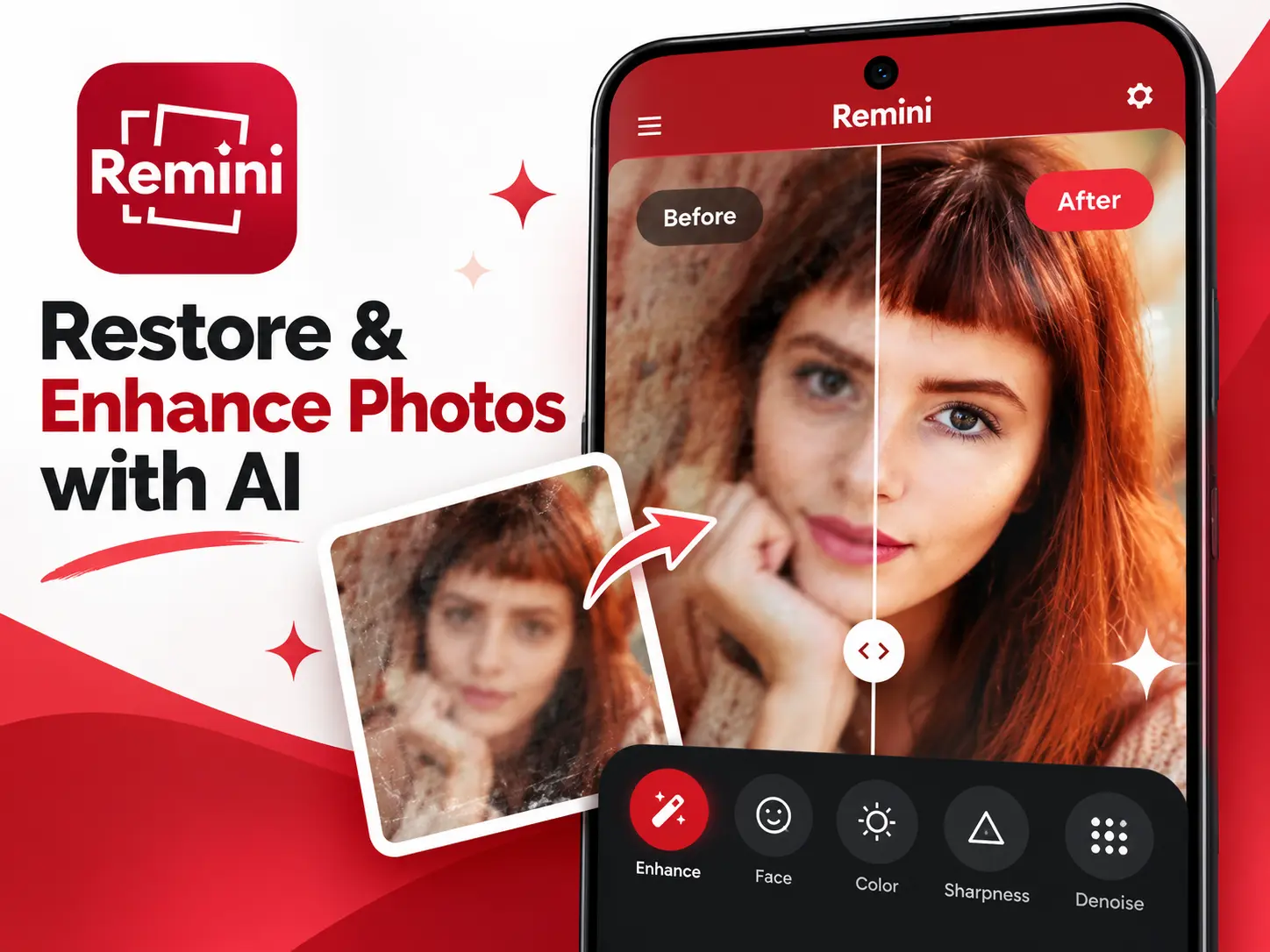
Unblur and Sharpen Photos
Remini can increase perceived detail in blurry or soft images. The result works best when the original photo still contains enough facial structure and contrast for the AI model to interpret. It is not a perfect recovery tool, so heavily damaged or extremely tiny images may produce artificial-looking details.
Restore Old Family Photos
One of Remini’s strongest use cases is old photo restoration. Scanned prints often contain blur, faded faces and low resolution. Remini can make facial features clearer and improve overall sharpness, which is useful before saving or sharing old family memories.
Portrait and Face Enhancement
Portrait enhancement focuses on eyes, facial edges, hair and skin detail. This makes Remini popular for profile pictures, social posts, headshots and older portrait photos. For professional or documentary work, always keep the original file because AI enhancement can invent visual detail.
Denoise and Improve Low-Light Images
Noise reduction can make dark or compressed photos look cleaner. However, aggressive AI cleanup may smooth small textures, so compare the enhanced version with the original before replacing anything important.
AI Video Enhancement
Remini also promotes AI enhancement for video on supported plans and devices. Processing time can be much longer than photo enhancement because every frame needs additional computation, and availability may depend on the current subscription tier.
Remini APK Download for Android
For the safest Remini Android download, use the official Google Play listing. The button below opens the current Remini page, which is the best place to confirm compatibility, update availability and the developer identity before installing.
If you manually install an APK, check the file source and package identity first. APKNIKO’s APK verification guide explains practical checks, while our Complete APK Safety Guide covers suspicious permissions, modified installers and other warning signs.
How to Install Remini APK on Android
1. Download Remini from an official source. Google Play is recommended because it handles package verification and future updates automatically.
2. If using a standalone APK, verify the file before opening it. Avoid files advertising “unlimited premium,” “all subscriptions unlocked” or impossible AI credits.
3. Allow installation only for the source app when required. Android manages this permission per browser or file manager. See our Unknown Sources installation guide if you need help.
4. Open Remini and review permissions. Photo access is expected when you choose images to edit, but you should still review every permission Android displays.
5. Keep the app updated. AI services can depend on current server-side models and APIs, so old builds may lose features or stop working correctly.
How to Restore an Old Photo With Remini
Start with the highest-quality scan or original image you have. Open Remini, choose the enhancement option, select the photo and compare the generated result with the original. If the app offers multiple versions, inspect the eyes, teeth, hair and small facial details before saving.
For family archives, keep both files: the untouched original and the AI-enhanced copy. AI restoration is useful for presentation, but it should not replace the original historical record because the model may reconstruct details that were not actually visible in the source image.
Remini Free vs Premium
Remini can be downloaded for free, but the app includes advertising and in-app purchases. Free usage may include processing limits, ads or restricted premium models, while paid options can unlock additional enhancement capacity and advanced features. Pricing can vary by country and subscription period, so check the current in-app offer before paying.
Avoid unofficial “Remini Pro APK” or “premium unlocked” packages. Because Remini relies heavily on online AI processing and user accounts, modified clients cannot safely guarantee premium server-side services and may expose photos or account details.
Remini Privacy and Photo Safety
AI photo apps process personal images, so privacy deserves attention. Before uploading sensitive photos, review the current Remini privacy policy and Google Play data-safety information. Do not assume that every AI enhancement happens only on your phone; some processing may use cloud infrastructure.
For private documents, children’s photos, confidential work images or identity documents, consider whether an AI cloud service is appropriate before uploading. When the photo is irreplaceable, keep an offline backup as well.
Remini vs Other Android Photo Editors
Remini is strongest when the goal is automatic AI enhancement rather than manual color grading. For detailed manual editing, tools such as Lightroom or Snapseed may offer more control. For background removal and e-commerce product photos, a dedicated background-removal tool is usually more suitable than a restoration-focused enhancer.
If you also edit short-form video, see our CapCut APK guide and the InShot guide on APKNIKO.
Common Remini Problems and Fixes
Photo Enhancement Is Stuck
Switch to a stable Wi-Fi connection, close and reopen the app, and try a smaller image. Server load can also slow processing during busy periods.
Remini Says No Internet
Check whether a VPN, private DNS, firewall or data-saving mode is blocking the app. Try another network before reinstalling.
Enhanced Photo Looks Unnatural
Use a less aggressive enhancement option if available and compare several results. AI can over-sharpen skin, eyes or hair when the original image contains too little information.
Remini APK Will Not Install
Check storage, Android compatibility and whether an older build with a different signature is already installed. Our APK Installation Failed guide covers common Android installer errors.
Frequently Asked Questions
Is Remini free on Android?
Yes. Remini is free to download, but it includes ads and optional paid features or subscriptions.
Can Remini fix blurry photos?
It can improve many blurry or low-resolution photos, especially portraits, but results depend on the original image quality.
Can Remini restore old photos?
Yes. Old photo restoration is one of its most popular use cases, although AI may reconstruct details rather than recover them exactly.
Does Remini work offline?
Many AI enhancement features depend on online processing, so a working internet connection is usually required.
Is Remini MOD APK safe?
APKNIKO does not recommend modified versions. They can create privacy, account, malware and update risks.
Final Verdict
Remini APK is a strong Android choice when you want fast AI-based photo enhancement without learning a complex editor. It is particularly useful for portraits, old family photos, low-resolution images and quick social-media cleanup. Use the official build, keep originals backed up and treat AI-enhanced details as generated improvements rather than perfect reconstruction.