OpenTTD APK for Android: Download the Port & Build Your First Route
Description
OpenTTD APK for Android brings a detailed transport-management game to a touch screen through a community Android port. You build services that carry passengers or cargo between useful destinations. The main challenge is designing a working network, so the first session is easier when you begin with one simple route.
This guide distinguishes the Android port from the main desktop project. It uses project and port documentation checked on 15 October 2026, without claiming that APKNIKO benchmarked the game on a particular phone.
What is OpenTTD on Android?
OpenTTD is an open-source transport simulation inspired by Transport Tycoon Deluxe. Its main project documentation covers the game, while the Android port repository and its store listing identify the mobile distribution.
On Google Play, the Android port is published by pelya with the package org.openttd.sdl. This matters because the upstream desktop download page and a mobile port are not the same distribution channel. Check Android-specific instructions when dealing with controls or installation.
The game supports road vehicles, trains, ships and aircraft. A large network can become complex, but you do not need to learn every transport type before starting. A working bus service teaches several important ideas without the extra layout decisions of a railway.
OpenTTD APK download: get the Android port
The button opens pelya’s Android-port listing on Google Play. APKNIKO does not host a modified installer or a collection of original commercial game files.
Read the listing’s Android notes before installing. The port documents touch gestures and other mobile-specific behaviour. Check current device compatibility there rather than applying a desktop requirement or an old APK mirror’s specification to your phone.
If you follow a separate Android download route, start from the port’s own project links. Our APK download guide explains source checks, and the APK safety guide covers additional checks before installation.
Understand base graphics and first-run downloads
OpenTTD needs suitable base graphics, with separate options for sound and music. The official installation documentation explains the available open-source base sets. These are different from an APK update and different again from an optional gameplay add-on.
If the Android port asks for required content during setup, follow its instructions and use the free project-supported assets where offered. Allow time and storage for those downloads before expecting a complete offline session.
Do not assume that the original Transport Tycoon Deluxe graphics are included or freely redistributable. Open-source replacements provide a legitimate route without searching for a commercial game’s data files on an unrelated download site.
After setup, start a small map and confirm that you can view the landscape and open the main construction tools. If something is missing, identify whether it is base graphics, optional sound or a particular add-on before reinstalling the whole application.
Learn the mobile interface before building
The Android listing describes using two fingers to scroll the map while building roads or stations. Practise the documented gestures on a disposable game first. A touch-screen port can require a different approach from a mouse-based desktop tutorial.
Open and close a few windows, inspect the menus and find the pause control. Check the current port’s interface scaling options if text or buttons are difficult to use. A larger screen may make a complex layout more comfortable, but no particular screen size guarantees a good experience for everyone.
Create a save called Learning Map before experimenting. That gives you somewhere to make mistakes without confusing a valuable long-running company with a test session. Get used to saving and reopening it before expanding the network.
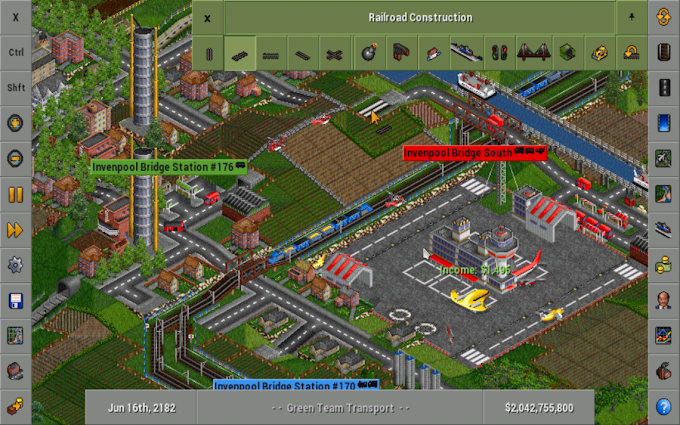
The official tutorial introduces the basic game and links to transport-specific lessons. Use its game concepts alongside the Android port’s control instructions. A desktop screenshot can explain a tool without matching every mobile gesture exactly.
Build one simple passenger service
Begin with a small route that you can inspect easily. Pick suitable destinations, connect them with a valid road and place stops that can serve the intended area. Follow the official bus tutorial for the exact construction and vehicle steps in the version you use.
Before buying several vehicles, check the route itself. Can a vehicle reach both stops and its depot? Are its orders correct? Is there a complete road connection? A small layout makes these questions easier to answer than a crowded map full of unfinished projects.
Run one vehicle and watch a full journey. Look for where it stops, whether it can turn around and whether it follows the intended orders. Correct the basic service before adding more vehicles to the same route.
The point of this exercise is understanding a system, rather than copying a guaranteed-profit formula. Results depend on the map, cargo, route and settings. A working service also makes a better learning reference than a large network you cannot yet explain.
Expand to trains after understanding the basics
Railways introduce extra layout and routing decisions. Stations, depots, track connections and signals all need to work together. Follow a small railway lesson before attempting a crowded junction inspired by an advanced screenshot.
For a first comparison, keep your working road service and add one simple train route elsewhere. That makes it easier to see which problems belong to the new railway. Changing every route at once can hide the source of a failure.
Pause when planning a complicated change if the game mode allows it. Review the connection before releasing vehicles. Keep a separate save before major reconstruction so you can examine an earlier working state if your new design fails.
If you enjoy infrastructure planning but want another type of strategy game, our Unciv Android guide covers turn-based civilisation gameplay. It is a different experience from OpenTTD’s transport operations.
Use add-ons and multiplayer with care
OpenTTD has optional content that can change graphics, vehicles or game behaviour. Add it for a specific purpose and read its requirements. A save may depend on particular content, so record what you used before moving the save to another device.
For multiplayer, check the server’s version and content requirements. A connection failure can result from a version or add-on mismatch rather than a defective Android installer. Read server rules and avoid sharing personal information in public chat.
Do not promise that a save or server will work across every build of the community port and desktop game. Consult the current documentation when moving between platforms, especially after a major update.
Protect saves before changing the app
Use the port’s current guidance to locate and copy save data. Android storage restrictions vary by release, so an old instruction to copy one hard-coded folder may not fit your phone. Check the copied save before deleting the original installation.
Save in more than one slot during a long project. A useful naming pattern identifies the company and milestone, such as First Rail Link. This makes it easier to return to a meaningful stage than relying on one repeatedly overwritten file.
Read our APK update precautions before uninstalling or switching distribution channels. Replacing an installer and protecting a transport network are separate tasks.
Frequently asked questions
Is OpenTTD APK an official upstream Android release?
This article links the community Android port published by pelya. The main OpenTTD project and the Android-port distribution should be identified separately.
Do I need original Transport Tycoon Deluxe files?
OpenTTD documents open-source base graphics and other free assets. Follow the supported installation route rather than assuming original commercial files are required.
Can I play a local game without internet?
Prepare required content first and test the exact single-player setup offline. Multiplayer servers and additional content downloads require a connection.
Why does the game feel complicated on a phone?
It is a detailed management game with many tools. Learn the port’s gestures, inspect interface scaling and start with one small service before building a large network.
A good first target
Install the correct Android port, complete the base-content setup and run one understandable route. Save it, reopen it and expand only when you can explain how it works. That approach makes OpenTTD’s depth easier to enjoy without relying on unofficial APK modifications.
Sources checked: 15 October 2026. See the linked Android-port repository, store listing and OpenTTD manual. Icon and gameplay screenshot are supplied through the Android port’s Google Play listing.