Hill Climb Racing 2 Android Guide: Upgrades & Cups
Description
This Hill Climb Racing 2 Android guide explains how to start racing, choose useful upgrades and make sense of Cups, Adventure and tuning parts. The first goal is simple: finish more runs with control. Buying a faster vehicle will not help much if every jump ends upside down.
Fingersoft combines short races with longer driving challenges, so the game suits players who enjoy learning a track and improving gradually. Start with one familiar vehicle, protect your saved progress and spend coins on a clear problem rather than every available upgrade.
Hill Climb Racing 2 Android: quick overview
| Item | What to know |
|---|---|
| Developer | Fingersoft |
| Game style | Physics-based driving, racing and vehicle progression |
| Price model | Free download with ads and optional in-app purchases |
| Connection | A reliable internet connection is required, according to Fingersoft support |
| Official Android source | Google Play, package com.fingersoft.hcr2 |
The developer describes different vehicles, environments and tuning options on its official game page. Compatibility and the available update should be checked on your own phone; this guide does not assume a fixed download size or promise a particular frame rate.
Download Hill Climb Racing 2 from Google Play
Use the button below to open Fingersoft’s official Android listing. Check the developer name before installing, and leave enough free storage for the download and later updates.
After installation, complete the tutorial before spending valuable resources. If you are comparing an APK offered elsewhere, read our APK download guide and APK safety guide first. An APK promising unlocked purchases is not the same product as the official store release.
Learn the driving controls before chasing speed
Use your first runs to understand how the vehicle reacts to acceleration, braking and uneven ground. Watch the tutorial’s control prompts, then repeat a short stretch of track with the same car. Change one input at a time so you can tell what helped.
A useful practice routine is to approach a familiar hill at moderate speed, observe the take-off angle and aim for a stable landing. On the next run, make one small adjustment. This gives you a clearer lesson than holding the accelerator through every obstacle.

Judge a run by more than its fastest moment. A slightly slower approach that avoids a crash can produce a better overall result. When a section repeatedly goes wrong, describe the problem to yourself: too much speed, poor balance or an unfamiliar landing. That description will also help you choose an upgrade.
Cups, Adventure and multiplayer explained
Cups: practise repeatable racing
Cups give you a racing goal and a reason to learn efficient routes. Compare your own starts, landings and finishes before blaming the vehicle. Repeating a track with the same setup makes it easier to notice whether a cleaner line actually improves your result.
There is an important detail behind the multiplayer label. Fingersoft explains that racing is asynchronous: opponents represent real players’ recorded performances, often called ghosts. You are not necessarily driving beside those people at the same moment.
Adventure: learn the terrain
Adventure keeps the distance-focused side of Hill Climb Racing. Treat it as a place to learn how a vehicle behaves across changing terrain. A successful distance attempt and a quick Cup race can ask for different driving decisions, so avoid judging every setup by one result.
For a short session, choose one goal: a more controlled start, a cleaner difficult section or a longer run. Switching constantly between vehicles and modes makes progress harder to understand.
Choose upgrades and tuning parts with a purpose
Separate basic vehicle upgrades from tuning parts. The vehicle’s upgrade screen changes its core performance, while equipped parts modify the setup further. Read the current descriptions in the garage because vehicle options and balancing can change.
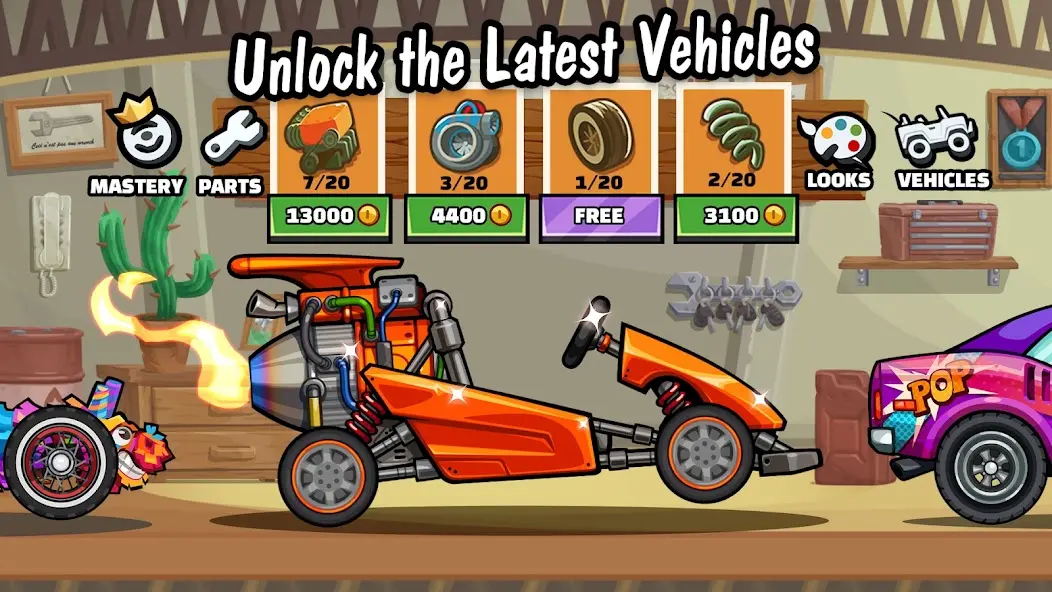
Use this decision process before spending coins:
- Identify the problem. Is the run ending because of a crash, a difficult hill or a poorly handled landing?
- Check your driving first. Repeat the same section without changing the setup.
- Read the relevant upgrade description. Choose something that addresses that problem.
- Make one change. Test it on familiar terrain before buying another.
Keep some coins available instead of spreading every resource across an unfamiliar garage. This is a budgeting approach, not a claim that one car or part is best for every mode. Your available vehicles, parts and preferred challenges should guide the choice.
Part collection also involves chance. Fingersoft says chest drops are randomized. Repeatedly opening a chest does not guarantee the particular part you want on your next attempt. Check what a reward actually contains before using limited resources.
Leave Vehicle Mastery for later
Mastery is an additional progression system for eligible, fully upgraded vehicles. The official Mastery explanation lists maximum basic stats and further XP/part requirements. A new player can focus on driving and ordinary upgrades first; Mastery does not need to be an immediate target.
Save your progress before changing phones
Open the game’s Settings and inspect the account connection options actually available on your device. Fingersoft’s account-saving guide explains how to connect a supported cloud account and check its connected status.
Do this before uninstalling, clearing app storage or replacing a phone. Some devices may show only local saving options; in that case, contact support about transfer possibilities before removing the existing installation. Keep a private record of the player details support asks for, and never publish account credentials in a comment.
Connection and update checks
If the game will not connect, test whether other online apps work, pause large downloads and try a stable network. Fingersoft’s connection checklist also covers network restrictions, correct device time and settings that may interrupt online access.
If a friend receives an update first, your installation may still be current for its rollout group. Fingersoft uses staged updates, so availability can spread gradually. Check Google Play again rather than immediately replacing the app with an unrelated package. Our guide to updating an APK without losing data explains why signatures and saved progress matter.
Frequently asked questions
Is Hill Climb Racing 2 an offline Android game?
Plan to play with an internet connection. Fingersoft’s current support guidance says reliable internet is needed; a distance-focused mode should not be treated as a promise of complete offline access.
Are Cup opponents racing live?
Fingersoft describes asynchronous multiplayer using recorded player performances. The competitive results come from real players, but those players need not be online beside you during the race.
Which vehicle should a beginner upgrade first?
Start with a vehicle you understand and use regularly. Learn its weak points, read its upgrade descriptions and make small changes. A universal purchase order would ignore your unlocked garage and available parts.
Does installing a newer APK guarantee an update?
No. Device compatibility, signatures and rollout availability still matter. Use the official listing and protect your save before making installation changes.
Why can my friend see an update before I can?
Fingersoft uses staged rollouts, so a new update can reach players gradually. Check your official store listing again later. Replacing the game with an unrelated APK is not necessary just because another player receives the release first.
A sensible first-session plan
Install from Google Play, complete the tutorial, connect an available save account and practise one familiar vehicle. Then try a few Cups, compare a distance run and choose one upgrade with a clear purpose. That is a useful starting point for this Hill Climb Racing 2 Android guide: controlled progress that you can understand and repeat.