Loopy on Android: A Beginner’s Guide to Simon Tatham’s Puzzles
Android 5.0+ according to the maintainer

Description
Loopy on Android is a logic puzzle inside Simon Tatham’s Puzzles. You draw one continuous closed loop along the grid edges. A number inside a cell tells you how many of that cell’s surrounding edges belong to the loop. Start on a small square grid, mark the edges you can rule out and check the loop as well as the numbers.
The most common beginner mistake is to satisfy individual clues while leaving two separate loops or a branch. This guide explains the rules, useful first deductions and a tiny worked example.
Which Android app contains Loopy?
Use Chris Boyle’s Android port of Simon Tatham’s Puzzles. The maintainer describes it as a free collection of single-player logic games with no ads and offline play. Loopy is one game in the collection; you do not need a separate app named Loopy from an unrelated publisher.
The Android package is name.boyle.chris.sgtpuzzles. The maintainer’s page links to Google Play and an APK route. Check that page for the available build and requirements rather than treating a copied “latest APK” label as verification. For a developer-provided installer, our Android APK installation guide explains the normal installation process.
The three rules to keep in view
- Match each numbered cell. On a square grid, a 2 means exactly two of that cell’s four edges are used.
- Make one loop. The finished line must return to its starting point without splitting into separate loops.
- Avoid branches and loose ends. At a dot used by the loop, two line segments meet. A T-junction or crossing does not form the required single loop.
An empty cell is not a zero. It simply gives you no numbered clue. Its surrounding edges still have to fit the same continuous loop as the rest of the board.
Set up a comfortable first game
Choose Loopy from the collection and begin with a small square-grid preset at an easy difficulty. The upstream game supports other grid shapes, but a square board makes counting the four sides straightforward. Learn that version before trying a triangular or more unusual tiling.
The Android distribution description documents pinch-to-zoom and a control for swapping press and long-press actions. Check the app’s help for the controls active on your installation. Test how to mark a line and how to exclude one before doing a long chain of deductions. Desktop instructions that mention a right mouse button need the equivalent touch control on a phone.
A tiny worked example: four 2s
Imagine a square board with two rows and two columns. Put a 2 in each of its four cells. One valid completed loop runs around the outside border of the whole board; none of the four internal dividing edges are used.
Check the top-left cell first. Its top and left edges belong to the outer border, giving it two used edges. Its bottom and right edges divide the board internally, so neither is used. The same count works for the other three cells.
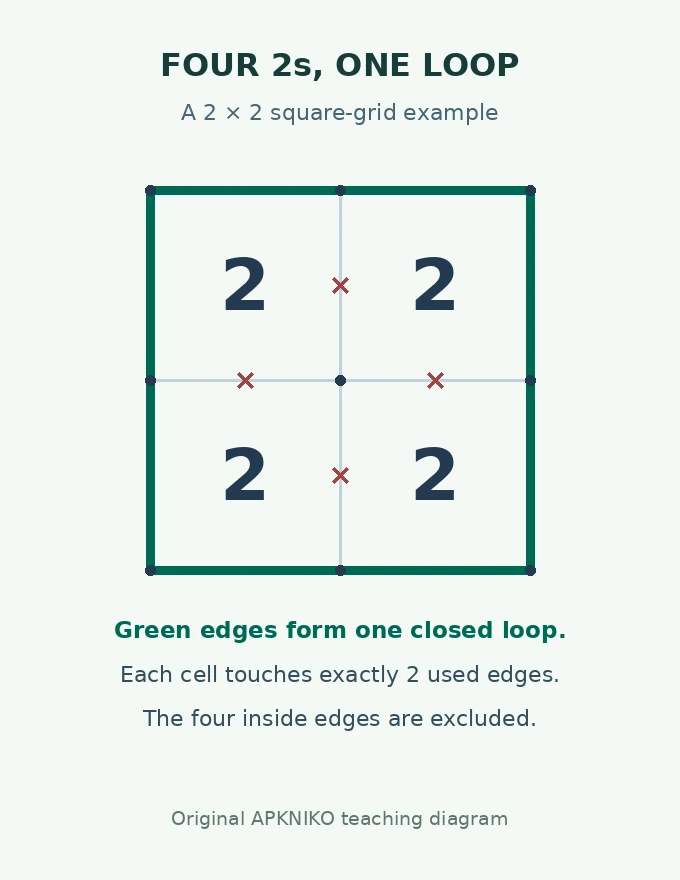
Now trace the line itself. Starting at the top-left dot, follow the perimeter until you return there. There is one connected loop, and each used dot has two connected segments. Checking the numbers alone would miss that second part of the solution.
This is a deliberately small teaching example, not a claim that every generated board can be solved by outlining its border.
Three deductions that help on square grids
A zero excludes all four surrounding edges
If a square contains 0, none of its four sides can be part of the loop. Mark those edges as excluded using the app’s control. A shared edge belongs to the neighbouring cell too, so that exclusion can make another clue easier to interpret.
A 3 with one excluded edge fixes the other three
A square 3 needs three used edges. If one side has already been ruled out, all three remaining sides must be used. The important condition is the known exclusion: a 3 by itself does not tell you which side to leave out.
Two used edges at a dot exclude further branches
Once two loop segments meet at a dot, do not add a third. Mark other incident edges as excluded where the controls allow it. Then revisit nearby cells: a clue that was ambiguous may now have only one possible set of edges.
Why a nearly finished board can still be wrong
| What you notice | What to check |
|---|---|
| Every visible clue seems correct | Trace the whole line. Are there two independent closed loops? |
| A line stops at a dot | A finished loop cannot leave a loose end. Review the most recent forced move. |
| Three lines meet at one dot | Look for a branch introduced while satisfying a nearby clue. |
| A square 3 has two excluded sides | Only two sides remain available, so an earlier assumption needs review. |
When stuck, choose one unresolved area and write down the reason for each next move. “This edge is forced because the cell needs one more side” is useful; guessing several edges at once makes an error harder to locate. If your build offers Undo, use it to revisit the uncertain move.
What to try after your first Loopy board
Increase one setting at a time: try a slightly larger square grid before changing both size and difficulty. That makes it easier to tell whether the challenge comes from more cells or harder deductions.
If you want a different kind of offline game afterwards, our Unciv Android guide covers turn-based civilisation strategy, while Shattered Pixel Dungeon is a roguelike with runs and character decisions. Neither uses Loopy’s loop-counting rules.
Sources and example: Android availability and controls were checked against the maintainer’s page and F-Droid on 16 October 2026. Puzzle rules were checked against Simon Tatham’s Loopy manual. The four-2 example and illustration are APKNIKO’s original explanation, not an app screenshot or a handset performance test.