Mobile Legends APK 2026 – Download Latest Version & 5v5 MOBA Guide
Description
Mobile Legends APK brings one of the world’s biggest mobile MOBAs to Android. Mobile Legends: Bang Bang is published by MOONTON and currently has more than 500 million downloads on Google Play. The game focuses on fast 5v5 battles, hero roles, three-lane maps, jungling, team fights and competitive matchmaking designed for mobile controls.
This APKNIKO guide covers the official Mobile Legends download, 5v5 gameplay, heroes, controls, Android installation, safety, performance tips and common problems. If you install APK files manually, first read our How to Install APK Files guide.
What Is Mobile Legends APK?
Mobile Legends: Bang Bang, often shortened to MLBB, is a real-time 5v5 multiplayer online battle arena game for Android. Two teams compete to control lanes, destroy defensive towers and eventually break the enemy base. Matches are designed to be shorter than many traditional PC MOBAs, making the game easier to play in mobile sessions.
The official Google Play listing describes a classic three-lane MOBA map with jungle areas, bosses and defense towers. Players choose heroes from different roles and work with teammates to control objectives, push lanes and win team fights.
Mobile Legends Features on Android
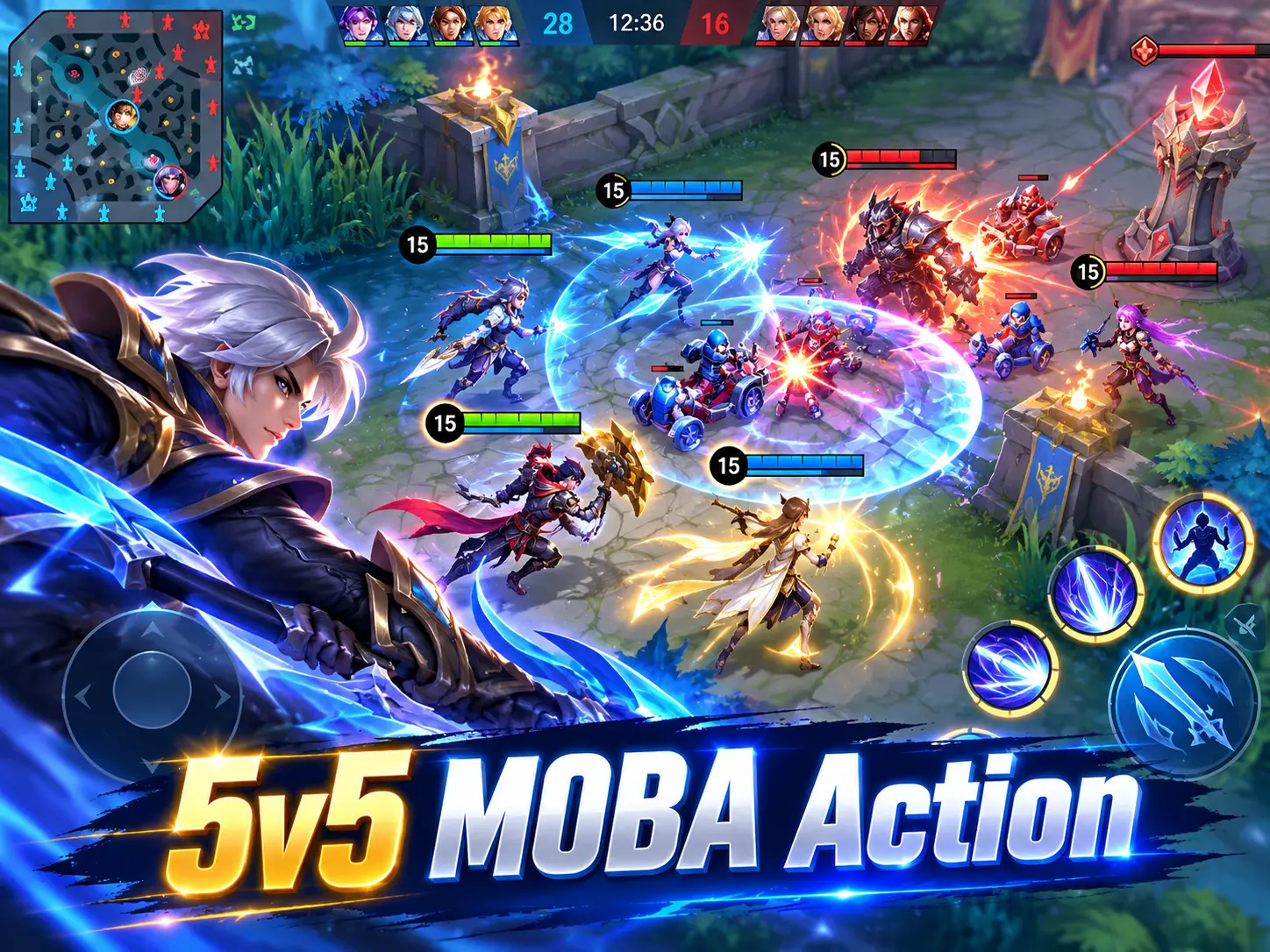
Real-Time 5v5 MOBA Battles
The main Mobile Legends mode is a five-versus-five match against real players. Each side controls heroes with different abilities, while computer-controlled minions move down lanes toward enemy towers and the base.
Tanks, Mages, Marksmen, Assassins and Supports
Team composition matters. Tanks absorb pressure, Mages provide burst or control, Marksmen deal sustained damage, Assassins target vulnerable enemies and Supports protect or enable teammates. Understanding hero roles is one of the fastest ways to improve in MLBB.
Mobile-Friendly Controls
The official game uses a virtual joystick on the left and skill buttons on the right. Targeting assistance, quick item purchase and touch-based controls are designed to make MOBA mechanics practical on a phone.
Fast Matchmaking and Shorter Matches
MOONTON promotes approximately 10-second matchmaking and around 10-minute matches as a core Mobile Legends feature. Actual queue and match length can vary by mode, region, skill level and game situation.
Reconnect and Offline AI Assistance
If a connection drops, the game includes reconnection support and temporary AI control to reduce the impact on the team. A stable connection is still important because real-time team fights are sensitive to delay and packet loss.
Mobile Legends APK Download for Android
Use the official Google Play page from MOONTON for the safest Mobile Legends Android download. The button below opens the official listing. This helps you avoid fake MLBB installers, modified packages and unofficial “diamond generator” apps.
Before installing any standalone APK, review our APK checking guide and Complete APK Safety Guide. Online competitive games should be installed only from sources you trust.
How to Install Mobile Legends APK on Android
1. Download Mobile Legends from the official Android source. Google Play is recommended because it selects the correct supported package for your device.
2. If using a standalone APK, verify the package first. Avoid files claiming unlimited diamonds, unlocked skins, anti-ban cheats or free paid content.
3. Allow installation only for the app opening the file. Android’s “Install unknown apps” setting should be enabled only when needed. See our Unknown Sources installation guide.
4. Open the game and let resources download. Mobile Legends may download additional game assets after the main app is installed, so use a stable connection and leave enough storage free.
5. Sign in using the account options inside the official game. Never enter your account credentials into third-party skin tools, mod menus or unofficial recharge pages.
Mobile Legends Gameplay Guide for Beginners
Learn One Role First
Instead of trying every hero immediately, start with one role and a small hero pool. Learning positioning, map awareness and item timing is easier when the hero mechanics are familiar.
Watch the Mini-Map
The mini-map shows lanes, allies, visible enemies and objectives. Checking it often helps you avoid ambushes and decide when to rotate toward a team fight or objective.
Play for Objectives, Not Only Kills
Towers, major objectives and the enemy base win matches. Chasing kills across the map can give the other team time to take objectives, so good MLBB play requires balancing fights with lane pressure and map control.
Build Items for the Match
A fixed build is easy for beginners, but stronger players adapt items to enemy damage, healing, armor and magic resistance. The right defensive or anti-heal item can change a difficult matchup.
Mobile Legends Android Requirements and Performance
The current Play Store compatibility check is the safest way to know whether your Android device supports the latest Mobile Legends build. Exact requirements can change with major updates, new graphics features and Android versions.
For better performance, keep enough free storage for resource packs, close heavy background apps and use a stable Wi-Fi or mobile data connection. If the phone overheats or frame rate drops, reduce graphics quality and high-frame-rate settings before long sessions.
Is Mobile Legends APK Safe?
The official Mobile Legends app from MOONTON is the safest Android version. The main risk comes from unofficial APKs, cracked installers, cheat tools and fake diamond applications. These can request suspicious permissions, steal account details or cause bans and update problems.
Keep Google Play Protect enabled and treat unexpected security warnings seriously. If the official package fails to install, troubleshoot the Android installer instead of downloading a random modified copy.
Mobile Legends APK vs MOD APK
A Mobile Legends MOD APK is an unofficial modified build. Sites may advertise unlocked skins, map hacks, unlimited diamonds or anti-ban features, but these claims can be misleading and risky. Because MLBB is an online competitive game, important account data and purchases are controlled by servers.
APKNIKO recommends the official build. A modified client can compromise your account or violate game rules, and no third-party APK can safely guarantee permanent premium items.
Common Mobile Legends Problems and Fixes
Mobile Legends Is Lagging
Use the nearest stable network, stop large downloads in the background and lower graphics settings. High ping can come from local network congestion, poor routing or server load.
Game Resources Are Not Downloading
Check storage space, Wi-Fi stability and Android background-data restrictions. Restart the game after the connection is stable and avoid clearing game data unless you understand what will be downloaded again.
Mobile Legends Keeps Crashing
Restart the phone, update the game and Android system components, and free storage. If crashes began immediately after a major update, check official MLBB channels for known issues.
APK Is Not Installing
A corrupted download, insufficient storage, incompatible Android version or signature conflict can block installation. Our APK Installation Failed guide covers common Android installer fixes.
More Competitive Android Games
For other high-action Android titles, see our Brawl Stars APK guide, Blood Strike APK guide and Delta Force Mobile APK guide. Each guide focuses on official downloads, safe installation and useful gameplay information.
Frequently Asked Questions
Is Mobile Legends free on Android?
Yes. Mobile Legends is free to install and play, with optional in-app purchases.
Is Mobile Legends a 5v5 game?
Yes. Its core classic MOBA gameplay is built around real-time 5v5 team battles.
How long is a Mobile Legends match?
The official listing promotes fast matchmaking and roughly 10-minute matches, but real match length varies depending on mode and gameplay.
Can I install Mobile Legends APK manually?
Android can install standalone APK files when permitted, but the safest option is the official Google Play version from MOONTON.
Should I use a Mobile Legends MOD APK?
No. Modified clients can create malware, account-security, compatibility and ban risks. Use the official build.
Final Verdict
Mobile Legends APK remains one of Android’s biggest competitive games because it compresses the familiar MOBA formula into fast, touch-friendly matches. The combination of 5v5 strategy, many hero roles, short queues and regular competition gives MLBB strong replay value. Install the official version, learn the map and objectives, and avoid unofficial mods that put your account at risk.