
Pixel Wheels APK for Android: Official Download & Racing Guide
Description
Pixel Wheels APK for Android is a straightforward choice if you enjoy small, top-down racing games. You drive around compact tracks, compete for position and use bonuses to influence the race. The project offers Android downloads through Google Play, F-Droid and its linked itch.io page.
This guide uses the developer’s information checked on 15 October 2026. The driving exercises below are suggested practice routines; APKNIKO has not measured lap times, frame rates or battery use on a test phone.
What is Pixel Wheels?
Pixel Wheels is a retro racing game by Aurélien Gâteau. Its overhead view lets you see the track and nearby competitors from above. The Android package is com.agateau.tinywheels.android, even though the public game name is Pixel Wheels.
The project features different tracks, vehicles and race bonuses. Its desktop and Android editions should not be assumed to expose every feature in the same way. For example, the repository describes local play with a friend on PC; that is not a reason to promise the same multiplayer mode on a phone.
The appeal is learning a readable track and improving your control over a short race. If you want a realistic cockpit view or a licensed motorsport simulation, read the game’s screenshots and description carefully before deciding it matches your expectations.
Pixel Wheels APK download for Android
The button opens the developer’s Google Play listing. There is no countdown timer, repacked installer or separate unlock code on APKNIKO.
The developer’s official project page links the supported Android download routes and recommends Google Play or F-Droid for receiving updates. It also notes that a new release can take a few days to appear on F-Droid.
If you need a standalone APK, follow the linked F-Droid listing and read its update guidance. Keep track of which channel you chose. Our APK download guide explains how to check the publisher and source.
Check the controls before a serious race
Use your first race to identify the available steering and action controls. Try them deliberately instead of holding several buttons at once. Your immediate aim is to understand how the car reacts, not to finish in first place.
Check the current version’s interface options if buttons are hard to reach. The project’s F-Droid release notes describe HUD-button scaling, but available settings can vary with the installed release. Adjust the control size before deciding that the game is unsuitable for your screen.
Hold the phone in a comfortable position and keep the control area clear of your fingers where possible. If you use a case with a raised edge, check whether it interferes with touches near the side of the display. A repeated missed input can be a comfort or layout problem rather than a lack of driving skill.
Play a short trial at ordinary settings. If offline use is important for a trip, launch the installed game and test the intended mode without a connection before leaving. Do not discover a first-run download or another setup requirement when you no longer have data access.
Learn a track before chasing faster laps
Choose one available track and stay with it for several attempts. Identify the first sharp corner, the longest straight and any narrow section where you often collide. These landmarks are easier to remember than trying to learn the entire circuit at once.
For the first attempt, focus on finishing cleanly. For the second, improve just one troublesome corner. For the third, try to keep a more consistent line through the same section. This gives each attempt a purpose even when your finishing position does not improve immediately.
Avoid making a new steering decision only after the car is already off course. Look slightly ahead along the track. An overhead perspective is useful because it shows upcoming turns, but it still takes practice to connect that view to the direction your vehicle is facing.
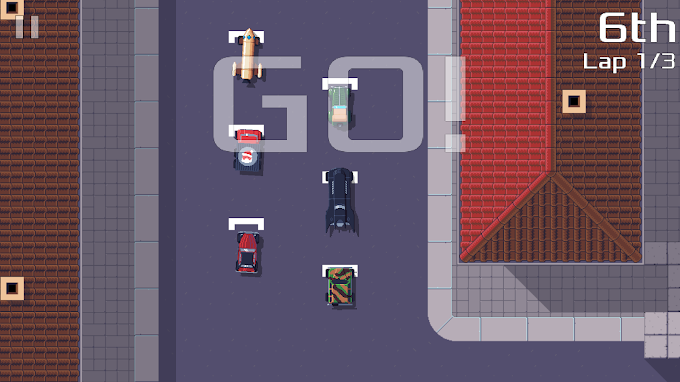
If you lose position after a collision, concentrate on returning to a controllable line. Repeatedly overcorrecting can cost more time than the original mistake. A stable finish gives you useful experience of the whole route, including sections you might otherwise never reach cleanly.
Treat bonuses as part of the race
The game’s description explains that bonuses can improve your position or interfere with competitors. Learn what a collected item does before building your strategy around it. The effect and timing matter more than pressing an action button whenever it becomes available.
During practice, note where useful pickups appear and whether reaching one forces you into a difficult line. A bonus is not automatically worthwhile if the detour leaves you facing the wrong direction or colliding with the track edge.
Keep the early learning process simple: understand the car, then the circuit, then the pickups. Trying to optimise all three at once can make it hard to tell why a race went wrong. The project repository provides the official overview and links to further project information.
Compare vehicles without changing everything at once
When different vehicles are available, try them on the same familiar track. Keep the same control settings while comparing how comfortable each one feels. Switching vehicle, track and control size together produces a confusing comparison.
You do not need to invent a universal ranking. One vehicle may feel easier for you to guide through a narrow section, while another suits a different course or play style. Choose based on a repeatable trial rather than an unsupported claim that one option always wins.
For younger players or someone new to touch controls, completing a clean lap can be a better first target than winning. Small, visible goals keep the learning process useful without suggesting that a download or hidden modification will provide guaranteed results.
Updates, storage and progress precautions
Use your chosen store’s update process and read release notes for meaningful changes. A low version number or small installer is not automatically a reason to replace a working game with a package from an unfamiliar mirror.
Before clearing app data or uninstalling, assume that local preferences or progress may be affected unless the current documentation says otherwise. Do not promise yourself that a store reinstall will restore everything. Our APK update guide explains the difference between an in-place update and a clean installation.
If a problem appears after changing settings, undo the last relevant change first. If it happens on one track only, record that track and the action involved. A useful bug report includes the game version, device details and steps that reproduce the issue, without private account information.
Troubleshooting touch and performance problems
For missed touches, check the control layout and test whether the same area responds in another app. For stutter, close unnecessary background tasks and compare a short session after the phone cools. Heat-related behaviour is different from a permanent compatibility limit.
Keep expectations grounded. This article provides no measured FPS claim and no guarantee for an older phone. Read our Android performance explanation if you want to understand why temperature and background activity can change the experience.
Frequently asked questions
Is Pixel Wheels APK available from the developer’s routes?
Yes. The official project page links Google Play, F-Droid and itch.io for Android. Follow those links rather than a lookalike download advertisement.
Does the Android edition have every PC feature?
Do not assume that. In particular, a desktop multiplayer description should not be treated as a confirmed Android feature.
Why does F-Droid show a release later?
The developer notes that F-Droid updates may take a few days to appear. Check the official release information before switching sources.
Will an unofficial modified APK make the game better?
It provides no reliable guarantee and adds another installer source to trust. Prefer the genuine game and learn its controls before changing packages.
Who should try Pixel Wheels?
Pixel Wheels suits players looking for overhead arcade racing and a game they can learn through short practice sessions. Start with one track and a comfortable control layout. If you prefer a different racing style, compare it with our SuperTuxKart Android guide.
Sources checked: 15 October 2026. See the linked developer page, source repository and F-Droid listing. App icon and gameplay screenshot come from the developer’s Google Play listing; rights remain with their creators.