
Temple Run 2 APK for Android: Official Download & Offline Guide
Check compatibility on Google Play
1B+ (Google Play, checked 2026-09-30)

Description
Temple Run 2 APK is a common search for Imangi’s Android endless runner. The important first step is finding the genuine game. This guide links to the official installation route and explains offline play, progress syncing and the checks to make before downloading.
Google Play Rating and Downloads
Store figures for Temple Run 2.
| Google Play statistic | Listing snapshot |
|---|---|
| User rating | 4.0 / 5 |
| Downloads | 1B+ |
| Checked | 21 October 2026 |
Source: official Temple Run 2 Google Play listing. Ratings can vary by country and device. Google Play reports cumulative download thresholds, and these figures can change.
Google Play lists more than one billion downloads, ads and in-app purchases. We checked the official sources on September 30, 2026. This article is a source-based overview, not a hands-on performance test. Device compatibility and the available build should always come from the current store listing.
What Is Temple Run 2?
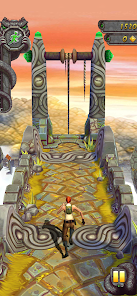
Temple Run 2 is Imangi Studios’ running adventure. You escape with a cursed idol while navigating cliffs, forests, mines and zip lines. The developer’s site describes running, jumping, turning and sliding as the core actions. It is a different title from the original Temple Run, so confirm the full app name.
Its appeal is the simple goal: keep the run going. If you enjoy reacting to obstacles, a short session can be enough to decide whether the game suits you. Begin with the tutorial, then judge the controls before exploring optional purchases or collecting every character.

Temple Run 2 APK Download Details
Developer: Imangi Studios.
Android package: com.imangi.templerun2.
Installation route: Google Play.
Cost: Free installation, with optional purchases.
Version, Android requirement and file size: Check the listing on your phone for the compatible release.
Get Temple Run 2 on Google PlayOPEN ON GOOGLE PLAY. This opens the official store page. APKNIKO does not host a standalone APK file for this game. Our Complete Guide to APK Downloads explains how to evaluate Android download sources.
Features and Offline Play
The store describes obstacle runs, different environments, characters, power-ups and global leaderboards. It also advertises offline play. Install and complete setup while connected, then test the mode you plan to use without Wi-Fi. Online features should not be assumed to work during an offline session.
For your first few runs, concentrate on staying alive rather than chasing every coin. A risky pickup can distract you from the next turn. Try a consistent route and watch where you lose a run. Practising one movement at a time gives you a clearer improvement target than changing everything together.
How to Install Temple Run 2 on Android
Choose the official listing
Open the Google Play link above on your Android device. Confirm Temple Run 2 and Imangi Studios. Review compatibility and available storage, then use the store installation control. Open the game when installation finishes and follow its introductory prompts. Use the same official channel for future updates.
If Play says the app is unavailable or incompatible, read that message before looking for another file. An old package may introduce new problems instead of solving the original one. Our APK vs Play Store Apps guide helps you compare the two installation routes.
Check a standalone package carefully
This article has not verified a publisher-provided standalone Temple Run 2 APK. Do not treat familiar artwork, a padlock icon or “latest version” text as proof of authenticity. Check the source, publisher and package identity together. Read the Complete APK Safety Guide before trusting an alternative download.
For legitimate publisher-distributed packages, our How to Install APK Files guide covers the Android steps. Keep Play Protect enabled. After a verified installation, remove the installer’s permission to install unknown apps. Avoid files that require extra software just to access the game.
Protect Your Progress Before Switching Phones
Imangi says Temple Run 2 supports playing across devices on the same platform, such as an Android phone and Android tablet. However, currency and streak progress for Daily, Weekly and Global Challenges do not sync across devices. Moving between Android and iOS is not covered by that same-platform guidance.
Before replacing a phone or reinstalling, check the game’s save and account options and read Imangi’s current support guidance. Keep a record of your player details through the game’s own settings. Never send your password to a website claiming it can transfer coins or restore an account.
Fix Downloads, Installation Errors and Lag
Start by identifying the problem. A store download that stalls, an APK installation error and a game that closes after launch need different checks. Record the message, device model, Android version and installation source before retrying. That gives you useful information if you contact support.
For a stalled download, check your connection and storage, then restart the phone. For an installer error, use our APK installation failed troubleshooting guide. Avoid clearing game data until you have checked your save options, because doing so can remove local progress.
For slow play, close demanding background apps and allow an overheated phone to cool. Change only one available setting at a time and compare another short run. We do not promise a particular frame rate or battery result because those depend on the phone and game build.
Temple Run 2 or Subway Surfers City?
Choose based on the experience you want to explore. Temple Run 2 uses an escape adventure setting; Subway Surfers City offers a city-themed runner. Try the official versions before spending on optional extras. Our Subway Surfers City Android download guide covers that game’s installation and offline-play details.
Frequently Asked Questions
Is Temple Run 2 free on Android?
The official listing offers free installation, with ads and optional in-app purchases. Review purchase controls on shared devices.
Can Temple Run 2 work without internet?
The official store advertises offline play. Complete installation and setup online, and test the features you need before a trip.
Is a Temple Run 2 MOD APK required?
No. Use the official installation route. This guide does not distribute modified files or verify unlimited-gem claims.
Will all my progress sync to another phone?
Imangi supports same-platform device use, but specifically excludes currency and certain challenge streaks from syncing. Check the current support page before switching devices.
Before You Download
Confirm the genuine publisher, review compatibility and protect your progress. Use the official store route linked here, and keep installation troubleshooting separate from gameplay settings. These checks help you make a more informed download decision.
Official sources: Temple Run 2 on Google Play, Imangi’s game page, and Imangi’s device-sync FAQ. Checked September 30, 2026.