WordPress plugin
WP Booking System Premium for Daily Rental Bookings
WP Booking System Premium handles reservations for rentals booked by the day. Visitors select dates in a calendar, submit a customizable form, and you can review their bookings and manage availability in the WordPress dashboard. It suits full-day and multi-day rentals; hourly appointment slots are not supported.
WP Booking System Premium handles reservations for rentals booked by the day. Visitors select dates in a calendar, submit a customizable form, and you can review their bookings and manage availability in the WordPress dashboard. It suits full-day and multi-day rentals; hourly appointment slots are not supported.
Take visitors from dates to a reservation
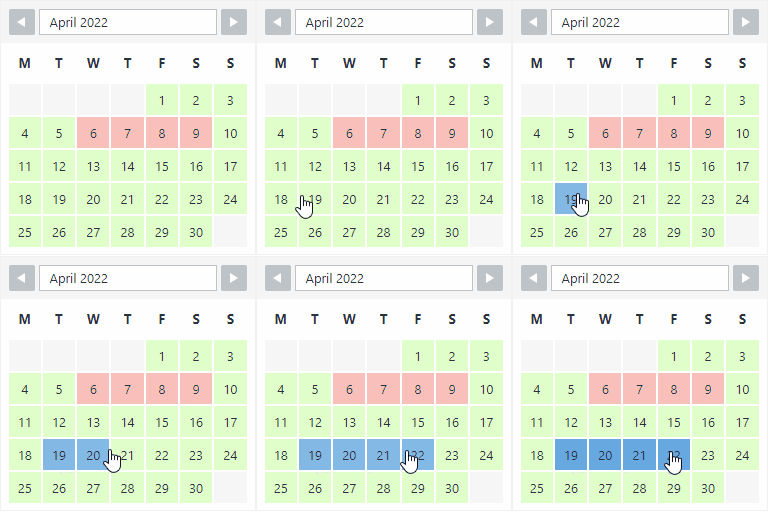
Visitors select a starting date and the number of days they want to book. A calendar legend helps them identify booked days. They then fill out your booking form and submit a reservation. You can choose which form fields to use and mark each as required or optional.
Premium works with online and offline payments. You can configure pricing, seasonal rates, extras, deposits, taxes, and discounts for bookings. Reservations are saved in the rental calendar, where you can view their details and manage availability.
Set up a calendar for each rental
Create unlimited booking calendars and forms, with separate setups for properties, rooms, boats, vehicles, equipment, campsites, or event rentals. Calendar controls include custom legends with colors and text, split arrival and departure days, multiple displayed months, and options for the first day of the week or the calendar’s starting month and year. You can also show an overview reservation calendar, edit multiple dates at once, show tooltips and week numbers, conceal past bookings from visitors, and automatically block booked dates.
Set minimum and maximum stay lengths and allowed start and end days. For more detailed rules, the Advanced Booking Restrictions add-on covers seasonal restrictions, fixed booking lengths, arrival and departure rules, booking windows, and turnaround periods.
Keep calendar information in sync
iCalendar Sync, Import and Export helps you coordinate calendar information for availability management. Premium also supports customizable booking notifications, confirmations, and reminders. User management provides another way to organize access and booking activity, and the system can be translated into any language.
Add the calendar to a page
Install and activate WP Booking System Premium, then make a calendar and booking form. Configure availability, date rules, payment settings, and form fields. Add the calendar to a page or post with its shortcode, the Gutenberg block, or the WP Booking System widget. After setup, review the calendar in the back end and configure notifications and synchronization for your rental process. Professional support is available for booking calendar questions.