WordPress plugin
Site Offline Pro: Coming Soon and Maintenance Pages
When a WordPress website is being built, updated, or temporarily taken offline, Site Offline Pro gives visitors a temporary page while you continue working. Choose a design, customize its sections, preview it, then enable offline mode with a click. The responsive, retina-ready layout is designed to work with any WordPress theme.
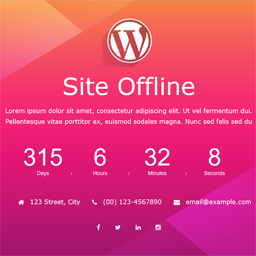
When a WordPress website is being built, updated, or temporarily taken offline, Site Offline Pro gives visitors a temporary page while you continue working. Choose a design, customize its sections, preview it, then enable offline mode with a click. The responsive, retina-ready layout is designed to work with any WordPress theme.
Preview the design before visitors see it
The Pro edition includes eight design templates. Add a countdown for a planned launch or return, then select a background picture, slideshow, or YouTube video background. Customize the logo, colors, and contact information, and disable sections you do not need. The layout uses Bootstrap 3.3.4 and HTML5 with CSS3 animations.
Available page content includes About Us, Team, Contact Information, Contact Form, Google Map, and Service pages. The add-on also lists more than 16 social profile settings with drag-and-drop arrangement, plus more than 500 Google Fonts. It supports translation-ready i18n and cross-browser use.
Give visitors ways to stay connected
Newsletter utilities can collect sign-ups before launch. Site Offline Pro lists seven or more newsletter options, integrations with Mailchimp, Madmimi, iContact, Constant Contact, Campaign Monitor, and GetResponse, and a subscribers list for managing sign-ups through the offline-page process.
Set who can access the website
Access settings include auto launch, IP access, visitor access, a landing page option, and full SEO control. These options let administrators work on the site while presenting an offline page to other visitors.
Set up and check the page
- Install and activate Site Offline Pro in your WordPress site.
- Open the extension settings and choose a design template or configure the available page sections.
- Add your logo, background, countdown, contact details, social profiles, and newsletter settings as needed.
- Use the live preview to review the page, then enable Site Offline mode with the activation control.
To check what visitors see, open the site in a different browser where you are not logged in. If a cache plugin is active and the offline page does not appear, deactivate the cache plugin temporarily and check again.