WordPress plugin
Vietnam Checkout for WooCommerce Pro
Vietnam Checkout for WooCommerce Pro adapts checkout for WooCommerce stores selling within Vietnam. Customers can enter a local address using province or city, district, and ward, commune, or town selectors.
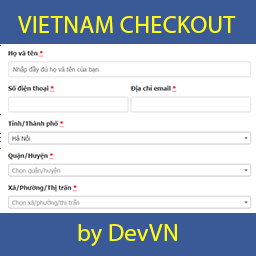
Vietnam Checkout for WooCommerce Pro adapts checkout for WooCommerce stores selling within Vietnam. Customers can enter a local address using province or city, district, and ward, commune, or town selectors.
Which checkout details can you collect?
The checkout can combine First name and Last name into one Họ và tên field, move the address field to the end, and conceal selected fields. You can add a shipping phone field, display the recipient’s phone number on the invoice, and remove shipping method titles. Province data is provided as arrays, so the add-on does not add SQL for this address information.
How can Pro calculate shipping?
Configure shipping costs by province or city, district, and ward, commune, or town. District rates can also depend on the order total. For example, a shop might set a standard shipping fee in Hanoi and offer free shipping for orders above a chosen amount, such as 500,000 VNĐ. Weight-based shipping can be calculated for districts and for wards, communes, or towns.
How are currency and payments handled?
The add-on shows the currency symbol as VNĐ instead of ₫. It also supports PayPal payments, with an adjustable exchange rate from VNĐ to currencies supported by PayPal.
What happens after activation?
Activating the plugin applies its checkout changes. Review additional settings in the plugin settings and configure location-based shipping rules if needed.
If province or city fields do not load on a newly added checkout page, add this filter to the active theme’s functions.php file:
add_filter('vn_checkout_allow_script_all_page', '__return_true');
How do you install and configure it?
- Install the plugin on the WooCommerce site.
- Activate the plugin.
- Open the plugin settings to review additional options.
- Configure location-based shipping rules when required.
- Test checkout fields and shipping calculations before accepting orders.